Remote
The remote git command is used to link local repositories with remote ones such as Github and Gitlab.
View associated remote repositories
The following command can be used to check what remote repositories are linked to the local repository by printing out their associated name:
$ git remote
origin
upstream
By convention the names origin and upstream are the most common names used for remote repositories and represent the following:
origin: The main repository that this local repository is connectedupstream: The source repository that the main repository is forked from
If you want a more detailed description of the linked remote repositories that includes the owner of the linked remote repository and what actions are avaialbe then include the -v flag:
$ git remote -v
origin  git@github.com:RobertForristall/community-wiki.git (fetch)
origin  git@github.com:RobertForristall/community-wiki.git (push)
upstream        git@github.com:Code-after-Coffee/community-wiki.git (fetch)
upstream        git@github.com:Code-after-Coffee/community-wiki.git (push)
Add a new remote repository
Normally you will not need to add any additional remote repositories to community projects if properly forked from the source repository since all links to the desired remote repositories will already be present in the cloned repository however, if additional remote repositories need to be linked then they can be by using the add sub-command:
git remote add <prefered-name> <git-name>
Where prefered-name can be any name that you desire for the link and git-name is the name of the repository as git sees it which can be obtianed from Github under the clone section of the repository.
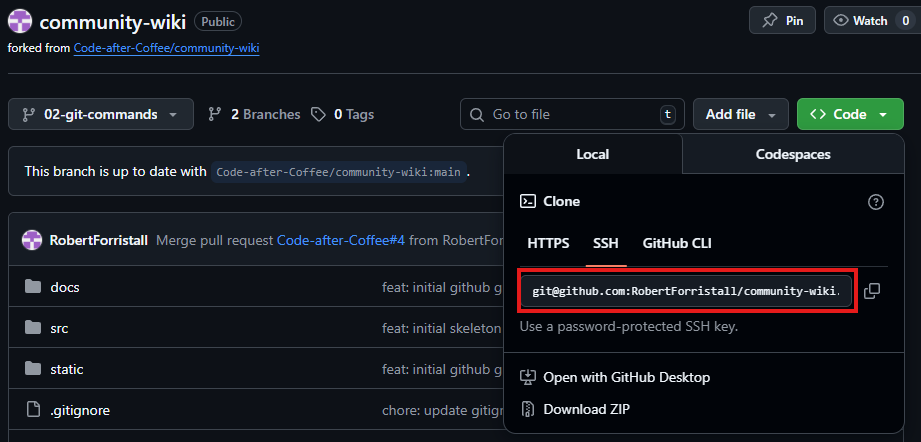
Example command where prefered-name is example-repo and git-name is git@github.com:RobertForristall/example.git:
git remote add example-repo git@github.com:RobertForristall/example.git